
Kick start Hadoop with right platformExclusively suited for Hadoop's multi server deployments
With data storage and high-performance parallel data processing


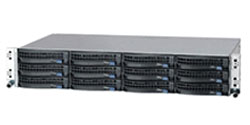
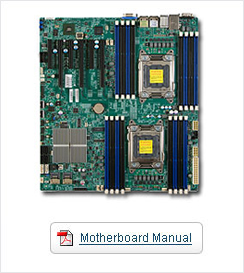
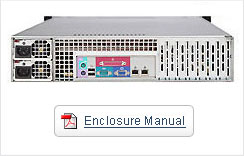
At IRON Global, we take pride in our quality. We validate each component we offer on every platform we sell to ensure compatibility. All aspects of a server are investigated and approved before we will sell a single unit. From the system BIOS, to thermals, to component firmware, we check it out first.
At IRON Global, we believe in the American workers. That's why all Iron iServers are assembled and supported right here in the United States. Every system we build is manufactured in our huge ISO 9001 certified facility in San Jose, CA. Buy American - get Iron Server @ the most competitive price.
| Physical Stats | |
|---|---|
| Form Factor |
|
| Dimensions |
|
| Processor/Cache | |
|---|---|
| CPU |
|
| Cache |
|
| System Bus |
|
| System Memory | |
|---|---|
| Memory Capacity |
|
| Memory Type |
|
| DIMM Sizes |
|
| Memory Voltage |
|
| Error Detection |
|
| On-Board Devices | |
|---|---|
| Chipset |
|
| SATA |
|
| SCU SATA (Storage Controller) |
|
| IPMI |
|
| Network Controllers |
|
| Video |
|
| Input / Output | |
|---|---|
| AHCI SATA |
|
| SCU SATA |
|
| LAN |
|
| USB |
|
| Video |
|
| Serial Port / Header |
|
| DOM |
|
| System BIOS | |
|---|---|
| BIOS Type |
|
| BIOS Features |
|
| Expansion Slots | |
|---|---|
| PCI-Express |
|
| Management | |
|---|---|
| Software |
|
| Power Configurations |
|
| PC Health Monitoring | |
|---|---|
| Voltage |
|
| FAN |
|
| Temperature |
|
| LED |
|
| Other Features |
|
| Product SKUs | |
|---|---|
| CSE-825TQ-R740LPB |
|
| Form Factor |
|---|
|
| Dimensions (stand-alone chassis / package) | |
|---|---|
| Height |
|
| Width |
|
| Depth |
|
| Gross Weight |
|
| Available Color |
|
| Expansion Slots |
|---|
|
| Drive Bays | |
|---|---|
| Hot-swap |
|
| Front Panel | |
|---|---|
| Buttons |
|
| LEDs |
|
| Ports |
|
| System Cooling | |
|---|---|
| Fans |
|
| Operating Environment (System) | |
|---|---|
| Operating Temperature Range |
|
| Non-Operating Temperature Range |
|
| Humidity Range |
|
| Non-Operating Humidity Range |
|
| Power Supply | |
|---|---|
|
|
| AC Input |
|
| DC Output +12V |
|
| Certification |
|
| Regulatory (Power Supply) | |
|---|---|
| Power Supply Safety / EMC |
|
IRON Global continually evaluates and tests the latest software innovations. We are experienced in installing and customizing the operating system and software products in your system to meet your specific needs. Below you'll find links to and information about our operating systems partners, hypervisors partners, and high performance computing partners.
Iron offers a complete line of high performance Virtualization Hypervisor servers that fully utilize server hardware virtualization capabilities. These build-to-order virtualized servers are configured for maximized virtualization performance, higher server utilization, increased security, minimized system downtime, and better efficiency rates while managing systems in mission-critical environments.
Iron's iServer and iClusters products can be preinstalled with an operating system of your choice to better support your unique business application, performance and environment needs. Operating systems other than those listed below can be installed, but require coordination with your sales engineer.
 | CentOSCentOS is an Enterprise-class Linux Distribution derived from sources freely provided to the public by a prominent North American Enterprise Linux vendor. CentOS conforms fully with the upstream vendors redistribution policy and aims to be 100% binary compatible.http://www.centos.org |
 | DebianDebian GNU/Linux is popular for high-performance computing due to its multi-platform support and ease of package management and administration. It provides a wide range of services, with over 8,700 packages to select from with the current distribution. Debian GNU/Linux is full featured, dynamic and also free to use and redistribute.http://www.debian.org/ |
 | FedoraRed Hat Enterprise Linux technology is derived from the Fedora Project. Fedora is a Red Hat- sponsored and community-supported open source project. It provides a public development platform and proving ground for new open source technologies.http://fedora.redhat.com/ |
 | Gentoo LinuxThe Gentoo Linux distribution includes a rich set of popular software packages and is relatively easy to install and upgrade. Because it is a source distribution, it is useful for organizations that wish to customize a Linux distribution for their high-performance systems yet maintain an easy install and upgrade ability.http://www.gentoo.org/ |
 | Microsoft Windows Server 2003Microsoft Windows Server 2003 is the latest version of the Windows Server platform. It provides enhanced security, increased reliability, and simplified administration to help enterprise customers across all industries. The Microsoft Windows Server 2003 family helps organizations do more with less by providing an infrastructure for higher productivity and efficiency.http://www.microsoft.com/windowsserver2003/ |
 | Windows XP ProfessionalThe Windows XP Professional operating system is the best choice for businesses of all sizes. Windows XP Professional integrates the strengths of Windows 2000 Professional, such as standards-based security, manageability, and reliability, with the best business features of Windows 98 and Windows Millennium Edition, such as Plug and Play, simplified user interface, and innovative support services. This combination creates the best desktop operating system for business. Whether your business deploys Windows XP Professional on a single computer or throughout a worldwide network, this new operating system increases your computing power while lowering cost of ownership for desktop computers.http://www.microsoft.com/windowsxp/ |
 | Red Hat's enterprise-class LinuxRed Hat's enterprise-class Linux operating system distribution is backed by the accountability of a major commercial software company and is stable, reliable and broadly supported. Easy to deploy and manage, Red Hat Enterprise Linux also provides various training & support options along with many industry and hardware certifications and certified applications. High- performance computing customers realize increased manageability with Red Hat Network and improved scalability with Red Hat Global File System.http://www.redhat.com/software/rhel/ |
 | NovellThe SUSE LINUX family is characterized by flexibility and versatility while delivering a scalable, high-performance foundation for secure enterprise computing. It delivers a degree of security, reliability, availability, scalability, and automated administration that only Linux-based systems can offer. SUSE supports its enterprise customers with a comprehensive range of qualified consulting, training and support services.http://www.novell.com/linux/suse/ |
 | FreeBSDFreeBSD® is an advanced operating system for modern server, desktop, and embedded computer platforms. FreeBSD's code base has undergone over thirty years of continuous development, improvement, and optimization |
Iron's HPC solution is designed to simplify HPC deployment and management. We start by building a comprehensive infrastructure stack built from leading industry-standard building blocks and best-in-class partner products. The result is a highly scalable HPC solution that can deliver exceptional performance and manageability at a fraction of the cost of proprietary systems.
 | Beowulf ClustersBeowulf Clusters are scalable performance clusters based on commodity hardware, on a private system network, with open source software (Linux) infrastructure. The designer can improve performance proportionally with added machines. The commodity hardware can be any of a number of mass-market, stand-alone compute nodes as simple as two networked computers each running Linux and sharing a file system or as complex as 1024 nodes with a high-speed, low-latency network.http://www.beowulf.org |
 | Windows HPC Server 2008Windows HPC Server 2008 provides a productive, cost-effective, and high-performance computing (HPC) solution that runs on x64-bit hardware. Windows HPC Server 2008 can be deployed, managed, and extended using familiar tools and technologies.http://www.microsoft.com/hpc/en/us/overview.aspx |
 | NVIDIA TeslaNVIDIA® Tesla™ computing solutions enable the necessary transition to energy efficient parallel computing power. With 240 cores per processor and based on the revolutionary NVIDIA® CUDA™ parallel computing architecture, Tesla scales to solve the world's most important computing challenges—more quickly and accurately.http://www.nvidia.com/object/tesla_computing_solutions.html |
 | ScaleMPEnables the creation of a single virtual system by aggregating multiple industry-standard x86 systems. vSMP Foundation software add-on creates virtual systems ranging from 4 to 32 processors (128 cores) and up to 4 TB of shared memory.http://www.scalemp.com/ |
 |
Intel Cluster ReadyThe Intel® Cluster Ready program makes it easier to experience the power of high-performance computing (HPC). Developed in conjunction with hardware and software vendors, the Intel Cluster Ready program is designed to simplify purchasing, deployment, and management of HPC clusters.http://www.intel.com/go/cluster/ |
In today’s competitive business climate, companies are faced with investing in state-of-the-art equipment to maintain a high level of customer satisfaction while reducing operating costs and improving profitability. To address this challenge and assist you in maintaining a competitive advantage, Iron Equipment Leasing offers lease financing solutions tailored to your specific needs. As a result, you are able to acquire the leading edge equipment you need now and upgrade as your business requirements change. With Iron Equipment Leasing, you receive complete lifecycle support from acquisition through disposal including flexible mid-term upgrade solutions and lease-end asset.
When leasing from Iron, you can expect very competitive lease rates, a quick response and minimal lease paperwork, making the process simple and straightforward. In addition Iron offers following leasing advantages:
To help you decide between leasing and buying storage, this tip looks at the pros and cons of each approach along with some situational considerations.
The fundamental difference between purchasing and leasing server and storage is that with a purchase, you pay or finance the acquisition in exchange for ownership and equity of the asset. On the other hand, a lease or rental involves periodic payment by a lessee to a lessor in exchange for use of an asset, with the lessor retaining ownership and equity of the asset.
Leasing and financing situations share some common benefits including shifting or deferring costs over a period time for lower monthly payments to ease cash flow. At times, a lease may not be cheaper from a total cost of ownership (TCO) perspective, and you would need to do a financial lease vs. buy analysis. Traditionally, leases have been sold as a means to afford expensive items, maximize cash flow, insulate yourself from technology obsolesce and relieve yourself of the burden of technology disposal. Even though cost per gigahertz of computing and gigabyte of storage continues to fall, leasing has been touted as a way to cope with a flat budget to meet increasing IT server and storage demands. Leases are an alternative to using cash or bank credit lines to maintain or improve financial stability of your business. There can be different financial and tax benefits or caveats for leases, so you should seek professional advice (tax, accounting, insurance and/or legal) for your situation.
A lease vs. purchase (or finance) decision hinges in part on your financial situation and business requirements. Other factors include personal and organization preferences, current market opportunities and economic conditions. How long you will be able to (and plan on) effectively using an asset also plays into the decision. Generally speaking, the longer you plan on using an item, the more sense it may make to make a purchase (outright or via financing). With a purchase, you own the asset and the equity in it; however, you also have a larger cash outlay or finance fees. An outright purchase can also put a strain on your cash flow and balance sheet. Situations and conditions change from an economic and technology standpoint over time, so it makes sense to revisit lease vs. purchase decisions periodically.
Fair market value (FMV) leases can be a good option if you plan on replacing your technology in three years or less and may have tax benefits depending on your business' location. A FMV lease generally involves returning the asset to the lessor at the end of the lease term or purchasing the item at fair market value. Another option is a dollar purchase for technology that you wish to keep for a long period of time with ownership transferring to you -- the lessee -- at the end of the lease term. A FMV would have a lower monthly premium than a dollar purchase option scenario.
Iron's unique partnership with leasing firms provide unique hardware and software technology lifecycle solutions and leasing programs. Some general things to consider when making a lease vs. purchase decision include:
To summarize, you should look at a lease vs. buy decision from a technology and business (finance, tax, insurance, etc.) perspective and balance the pros and cons to meet your particular needs. Revisit your purchase vs. lease polices from time to time to see if current economic, business, technology and other influences warrant a shift in your purchase vs. lease decisions.
With highly trained Technical Support Staff, IRON Global prides itself in offering the best product support. Our server, storage and appliance products are backed by product support, configuration assistance, training, last-mile maintenance services and more.
| Plans and Coverage | IRON Global Standard | IRON Global Advance | IRON Global Silver | IRON Global Gold | IRON Global Platinum | IRON Global Enterprise |
|---|---|---|---|---|---|---|
| Help Desk Support | ||||||
| Self Help via Online Knowledgebase | ||||||
| Resolution via Email (Web-Form) | ||||||
| Resolution via Email (Web-Form) + Phone | ||||||
| Coverage Hours | 9am-5pm | 9am-5pm | 9am-5pm | 24 x 7 | 24 x 7 | 24 x 7 |
| Coverage Days | M-F | M-F | M-F | 365 Days | 365 Days | 365 Days |
| Support Resolution Coverage | ||||||
| L1 Hardware Deploy - Quick Start Guide Assistance | ||||||
| L2 OS Installation & HW Troubleshooting | ||||||
| L3 Advance Configuration - OS / Apss / Network etc | ||||||
| L4 Data Center Config & Root Cause Analysis | ||||||
| Performance Review Meeting | ||||||
| Follow the Sun worldwide coverage | ||||||
| Hardware Service: Depot Repairs | ||||||
| Depot Repairs via RMA | ||||||
| Hardware Service: Onsite Repairs | ||||||
| On-Site Technician Visit | ||||||
| On-Site Response Time | Next Day* | Same | 4 Hours* | Onsite Staff | ||
| On-Site Coverage Hours | 9am-5pm | 9am-5pm | 9am-5pm | Onsite Staff | ||
| Hardware Service: Parts Replacement | ||||||
| Advance Parts Replacement | ||||||
| Terms: Coverage Period | ||||||
| IRON Global Standard Warranty - Included (Years) | 2 | - | - | - | - | - |
| IRON Global Warranty Extension - Option (Years) | 1 (Total 3) | - | - | - | - | - |
| IRON Global Premium Coverage - Option (Years) | - | 1, 2 or 3 | 1, 2 or 3 | 1, 2 or 3 | 1, 2 or 3 | 1, 2 or 3 |
IRON Global includes 2 Years of Standard Warranty Coverage on every Standard system (listed on website) sold and 1 year for Custom system. The coverage period can be extended by 3 years. This warranty offering includes:
Customers can upgrade their Standard Warranty with an option for Advanced Parts Exchange. This plan offering includes:
Customers can upgrade their Standard or Standard/AE Level Warranty to the Silver Level Service Plan. This plan offering includes:
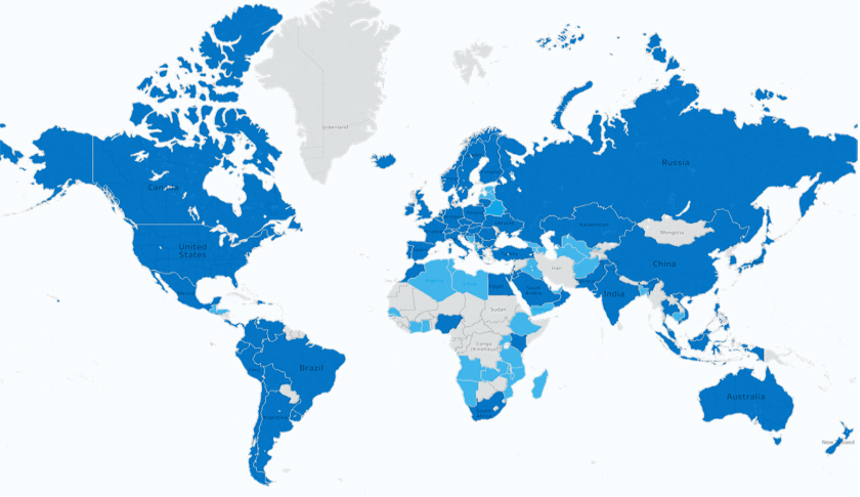
Field Service Engineers (FSE) & Warehouse Stocking Location (WSL)
Field Service Engineers (FSE) Only
Details Available on Request
Delivering an end-to-end turnkey OEM solution.
Optimized platforms designed to reduce time to market.
Custom design employing a holistic approach to meet requirements.
Custom integration to build products that meet customers’ specifications.
Global logistics to help streamline shipment and reduce supply chain risks.
Lowering your total cost of ownership.
Have a question or comment? Leave us with an inquiry and a team member will help you shortly.